Let employees use AI.
Keep control of your data.
Proprietary code, customer data, and confidential business information ends up in AI chatbots every day, whether that’s an approved copilot or a personal ChatGPT tab. Nightfall gives you real-time visibility and control over what employees put into AI tools, with 24/7 detection, monitoring, and remediation.

The latest blind spot: what employees type into AI
Your disjointed, legacy DLP stack is completely blind to what’s happening in browser tabs. This isn’t a hypothetical.
Employees aren’t trying to cause a breach. They’re trying to get work done faster, and AI makes that easy in a way legacy DLP was never built to see.
The majority of employees admit to pasting sensitive corporate data into ChatGPT and other AI apps.
Developer teams routinely upload proprietary code to Deepseek and Copilot without oversight.
Sales teams paste entire customer databases into Gemini and Perplexity for analysis.
Finance departments input financial projections into Grok for summarization.
Legal teams upload draft contracts to ChatGPT for review.
When employees copy-paste credentials or API keys into AI prompts, they create permanent, unrecoverable exposure.
Seven controls between the keyboard
and the AI app
Nightfall’s browser plugin sits where the data moves: the prompt box, the upload dialog, the clipboard. Select a capability to see how it works.
Real-time prompt monitoring
Unlike legacy DLP that catches breaches after they’ve happened, Nightfall’s browser plugin sees what employees are typing into AI apps before it’s submitted. Secrets, credentials, PHI, PCI, PII, and confidential information get identified in real time, not after exposure.
- Secrets
- Credentials
- PHI / PCI / PII
- Confidential
> prompt.scan app=chatgpt.com user=m.chen detectors=[aws_secret] verdict=REDACT latency=38ms
File upload interception
Most companies miss this entirely: employees uploading entire spreadsheets, codebases, and design documents directly to AI apps. Nightfall intercepts file uploads originating from corporate SaaS apps before transmission, stopping IP leakage before it happens.
- Spreadsheets
- Codebases
- Design docs
> upload.intercept file=customers_q3.xlsx origin=drive.google.com dest=gemini verdict=BLOCK
Smart content redaction
When sensitive content is detected in a prompt to ChatGPT, Deepseek, Copilot, Gemini, or other AI apps, Nightfall redacts just the problematic content, not the entire prompt. Employees stay productive. Security stays in control.
- Partial redaction
- Prompt preserved
> redact span=[412,448] type=credit_card replaced="[REDACTED]" prompt_submitted=true
Clipboard monitoring
Nightfall tracks copy/paste actions to AI tools, giving a complete audit of data movement. When sensitive content is copied from Mac or Windows devices and pasted into AI apps, you can monitor or block it instantly.
- Copy / paste audit
- Monitor or block
> clipboard.paste src=salesforce.com dest=perplexity.ai rows=2140 mode=BLOCK
Human Firewall coaching
When sensitive content is detected in a prompt, the employee gets an immediate, contextual notification explaining why the content is a problem, turning an invisible block into an educational moment instead of silent friction. Security operations gain the same visibility: which users or groups are attempting to share what type of data with which AI app, so training and policy can target the actual risk.
- Contextual coaching
- Group-level visibility
> coach user=a.patel msg="This prompt contains an API key. It has been redacted." acknowledged=true
Data lineage
Know exactly which corporate documents are being copied into AI apps. Trace the movement of IP from document to AI prompt with full visibility into source, destination, and every user action in between.
- Source
- Destination
- Every action between
> lineage doc="Roadmap 2027.docx" → copy → paste → chatgpt.com user=j.ortiz hops=3
Frictionless deployment
Deploy across the organization through Chrome Enterprise or MDM in minutes, to thousands of users simultaneously, with no proxy configuration or certificate management. Employees log in seamlessly through their Chrome profile or corporate email, and the plugin updates automatically.
- Chrome Enterprise
- MDM
- Auto-update
> deploy method=chrome_enterprise endpoints=4,812 status=ACTIVE elapsed=6m
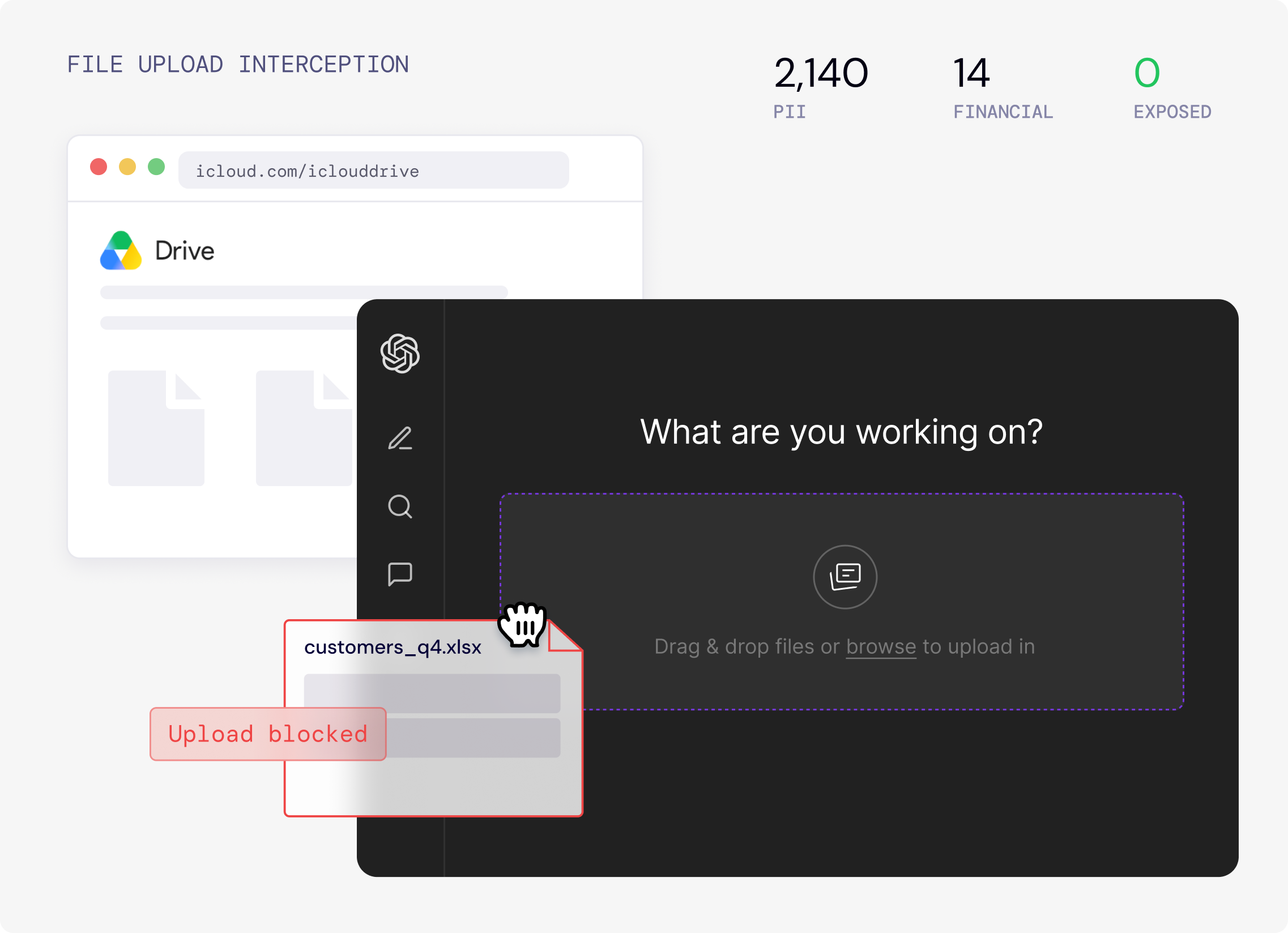
A customer list gets dragged into ChatGPT. It never leaves.
A sales rep drags customers_q4.xlsx from Google Drive into ChatGPT for a quick churn summary. Nightfall’s browser plugin intercepts the upload before transmission, classifies 2,140 PII records inside, blocks the file, and tells the rep why, with a pointer to the approved copilot that already has CRM access.
- Upload intercepted in the browser, before it hits the network
- File contents classified: PII, financials, confidence
- Employee coached, SecOps gets lineage: Drive → ChatGPT, 0 exposed
Stop exposure before submission, not after breach
Legacy DLP alerts you after data is already out. Nightfall checks every AI prompt before it's sent and blocks credentials, PII, PHI, and IP on the spot. Paste a database schema into Deepseek or a codebase into Copilot, and it never leaves.
Precision, no manual tuning
Nightfall's pre-trained AI models detect secrets, PHI, PCI, and PII out of the box. They read context and intent, so there's nothing to tune, and they keep learning from your environment.
Alerts after exposure
Blocks before submit
Trusted by 10% of the Forbes AI Top 50
Employees paste sensitive data into AI apps every day, and traditional security tools can't see or control it. Nightfall catches it before it reaches the model.
- Browser plugin, no proxy or certificates
- Works on any network
- Label true/false positives
Employees move fast. Nightfall lets you control it.
Real-time detection, in-line redaction, and full lineage on every prompt.
- A 30-minute call
- Tailored to your stack