AI agents now do real work on your systems
A couple of years ago, AI risk mostly meant someone pasting text into a chatbot. Today it's an agent on a developer's laptop that reads your code, runs shell commands, calls MCP servers and writes code that ships to production. Often nobody is watching each step.
Coding agents like Claude Code, Cursor and Codex are now on thousands of company laptops. Employees can add plugins, skills and MCP servers to them in seconds, usually without any review. Your own engineering teams are also building AI features that send customer data to model APIs.
Most security teams can't yet answer three basic questions:
- Which AI agents, MCP servers and plugins are running in our environment?
- What sensitive data are they reading, sending or writing?
- Can we stop a risky action before it happens?
Below, we cover where the risks are, four practical steps to manage them, and how Nightfall helps with each one.
The new attack surface
An AI agent is made of several parts, and each one can leak data or be misused.
Three problems come up most often:
- Shadow agents. Security teams don't know which agents and MCP servers are installed, so they can't assess them.
- Secrets in context. Agents read config files and logs freely. Credentials end up in prompts, transcripts and model provider logs.
- Indirect prompt injection. A web page, issue or file contains instructions, and the agent follows them using the tools and permissions it already has.
Traditional DLP tools miss most of this. They see encrypted traffic or a terminal process, but they can't tell that an agent is about to send a customer table to an MCP server.
Step 1: Discover every agent, MCP server and plugin
Start by finding out what's actually in use. Nightfall gives you a live inventory of the AI tools across your company.
It finds the AI agents and IDEs on every laptop, from popular harnesses like Claude Code, Cursor, VS Code and Codex to newer tools, plus everything connected to them. When someone adds, changes or removes something, the inventory updates and your team can be notified.
What Nightfall finds
- MCP servers, both local and remote, and where each one comes from.
- Shadow MCP servers: servers running on a device that no configuration declares.
- Hooks that each agent has configured.
- Plugins and skills, including what is installed versus only available in a marketplace.
- AI extensions inside IDEs.
How Nightfall scores risk
To help you decide which servers to look at first, Nightfall rates every MCP server from Low to Critical based on four things:
Every score comes with a plain-English explanation, so an analyst can see why a server is risky without digging through its code. When you know better, you can override the score or the provenance.
What admins do with it
- Approve trusted servers into sanctioned collections that policies can reference.
- Prioritize Unknown and Community servers with high-risk tools.
- Drill into any device, or export the inventory for audits.
Step 2: Inspect inside the agent with native hooks
Modern coding agents expose hooks: points where a security tool can see what the agent is about to do and approve or stop it. Because hooks run inside the agent, they see prompts, commands and tool calls in plain text, before anything leaves the device.
Nightfall ships managed hooks for popular harnesses like Claude Code, Cursor, GitHub Copilot and Codex. Every prompt, action and response passes through Nightfall's detection and your policies, and Nightfall decides whether it goes ahead.
Two ways to write a policy
- By content. Block when a prompt, command, file or tool call contains secrets, API keys, payment cards, PII, PHI or any other Nightfall detector.
- By tool. Block a specific MCP server or tool no matter what it carries, and scope rules to particular agents.
Each policy can block the action or let it through and record a violation, with a custom message that tells the user why.
What this looks like in practice
- A developer asks the agent to run a command containing a card number. It is blocked before it runs.
- The agent tries to write a file full of customer records. The write is blocked and the file is never created.
- An MCP call carries an API key in its arguments. It is stopped before reaching the third-party service.
- An admin bans one risky MCP tool. Every call to it is blocked, on every device.
Managed hooks are controlled centrally by your security team, so individual users can't switch them off.
Step 3: Check AI usage at the provider with inference hooks
Inference hooks are a second way to get the same protection. Instead of running on the laptop, they check the conversation on the model provider's side, before the model answers. That means one setup covers every place your people use the AI service: the browser, the desktop app, and coding agents on the endpoint, on both company and personal devices.
Nightfall integrates with Anthropic's Inference Hooks, which covers claude.ai, Claude Code and Claude Cowork. An admin connects Nightfall once in the Anthropic console, and from then on every turn of every conversation is checked against your Nightfall policies.
What Nightfall checks
- User prompts
- Connector and MCP tool calls, and what they return
- Shell commands and their output
- Model responses
A policy can block on sensitive content, such as a customer list pasted into a prompt, or block a connector outright. A blocked user sees a clear message with a reference ID that the security team can trace back to the violation.
Endpoint hooks or inference hooks?
Many teams use both. Native hooks cover the many agents on company laptops, and inference hooks cover the browser and personal devices.
For Claude Cowork, Nightfall can also take in Cowork's activity telemetry, giving a searchable record of prompts, tool calls and file access checked against your policies.
Step 4: Control MCP access through a gateway
Discovery tells you which MCP servers people use. A gateway lets you decide which ones they can use, with which permissions, and keeps a record of everything they do.
The Nightfall MCP Gateway gives your company one MCP endpoint. Employees connect their agent or AI app to it and sign in once. Behind that single connection sit all the servers your admins have approved.
What the gateway gives you
- A curated catalog. Choose from a library of vetted servers for tools like GitHub, Linear, Notion, Sentry, Atlassian and Stripe, or add your own.
- Tool-level control. Enable a whole server or individual tools, such as allowing "read issues" but not "delete repository".
- Credential brokering. The gateway manages each user's access to backend services centrally. Tokens stop living in config files on laptops, and access can be revoked in one place.
- Policies by tool, server and group. Write allow and block rules by tool, server, user or identity-provider group, and scan tool requests and responses for sensitive data. Run a policy in observe mode to see what it would catch, or enforce it to block.
- A full audit trail. Every tool call is logged with who made it, which tool, and what the policy decided, ready to search and export.
The gateway also shields the servers behind it, with rate limits and protection against requests to your internal network.
Putting it together
No single control covers every agent, so the four steps work together. Discovery finds the risk. Native hooks stop it on managed laptops. Inference hooks stop it at the model provider, on any device. The gateway decides which tools agents can reach at all.
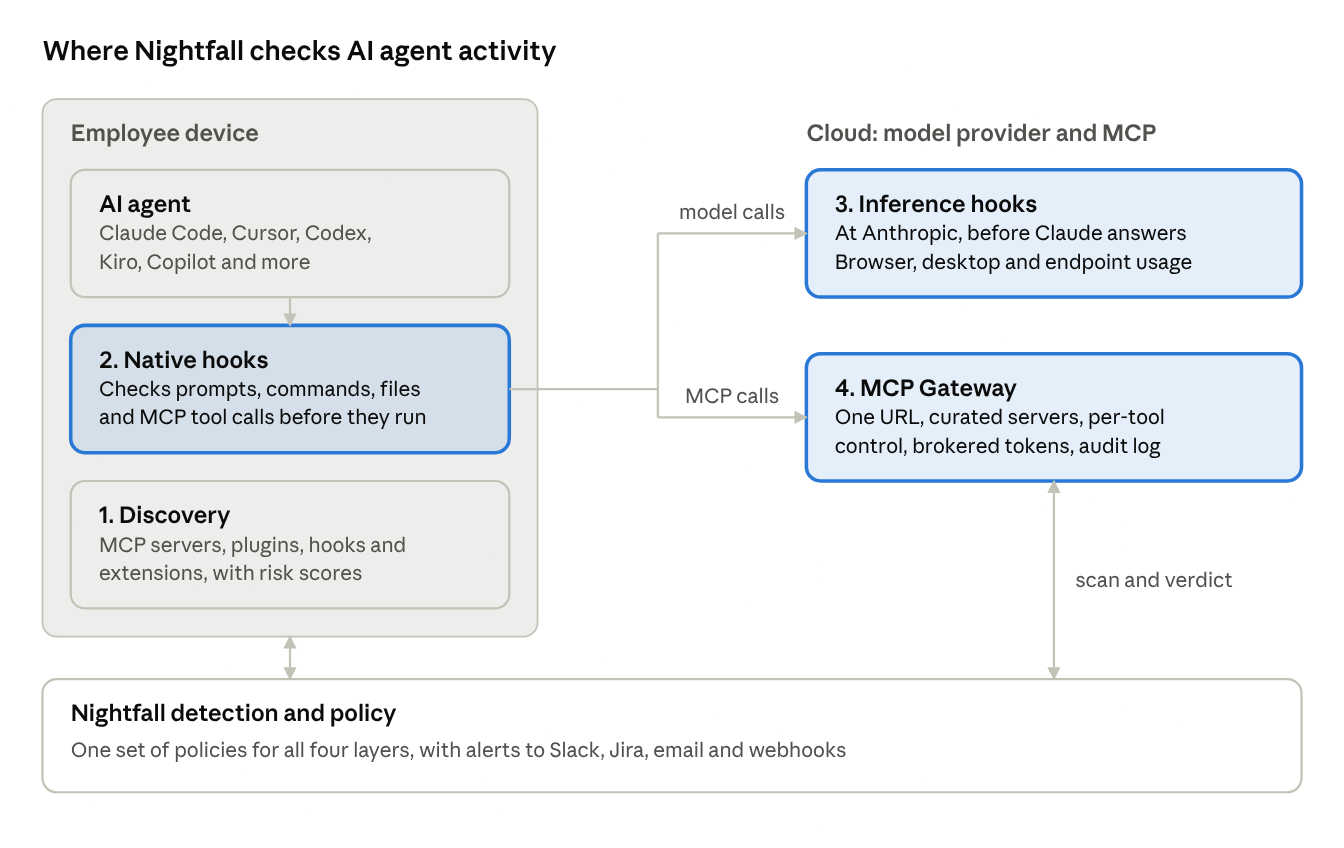
How Nightfall's four layers fit together
Every layer sends its checks to the same Nightfall detectors and policies, so one rule like "never send payment card data to an AI tool" applies everywhere.
A day-one checklist
- ☐ Deploy the Nightfall endpoint agent and review your AI inventory. Look first at Unknown and Community MCP servers and at shadow servers.
- ☐ Approve the servers you trust into a sanctioned collection, and decide what to do about the rest.
- ☐ Turn on Nightfall hooks for your coding agents. Start in monitor mode for a week to see real usage.
- ☐ Turn on blocking for the highest-risk data first: secrets and API keys, payment cards, and customer PII.
- ☐ Connect inference hooks to cover Claude everywhere it is used, including the browser and unmanaged devices.
- ☐ Move teams to the Nightfall MCP Gateway so credentials live in one place and every tool call is logged.
- ☐ Route AI agent violations to the Slack channel or Jira project your security team already watches.
Getting started
AI agents are now part of how your company gets work done, and banning them rarely works. Start by seeing what's in use, then add policies where agents actually take action.
Nightfall gives you that with one console and one set of policies across discovery, endpoint hooks, inference hooks and the MCP gateway. Violations go through the same Nightfall workflow you already use, with alerts to Slack, Jira, email or webhooks.
Want to see what AI agents are running in your environment today? Reach out to the Nightfall team for an AI agent risk assessment.

.svg)
.svg)


